
Understanding Fabric Ontology
What problem is Fabric Ontology trying to solve?
For years, most data conversations have started with tables. We ask where the data lives, what columns are available, how the joins work, and whether the data is in a warehouse, lakehouse, semantic model, or some other system. That makes sense, because tables are how most of us have worked with data for decades. But tables are not how the business thinks.
A business thinks in terms of customers, products, orders, shipments, assets, flights, runways, employees, policies, and actions. The problem is not usually a lack of data. The problem is a lack of shared meaning. Organizations often have the same business concept represented multiple ways across teams and systems, creating what I would call semantic drift. Sales may define a customer one way. Finance may define it another way. Operations may have yet another version in a different system with different keys, names, and assumptions. That is exactly where Fabric Ontology becomes important. It is designed to close the gap between physical data structures and business meaning.
Fabric Ontology matters because AI makes this problem more visible. Humans can often work around inconsistent definitions through tribal knowledge, documentation, and meetings. AI agents cannot do that reliably. If the business meaning is not explicit, AI has to infer intent from schemas, naming conventions, and queries, which increases the risk of inconsistent or unreliable answers. That is why ontology is becoming such an important concept in modern data architecture.
What is an ontology in Microsoft Fabric?
An ontology in Microsoft Fabric is a business abstraction layer that defines core entities and relationships, and binds them to data sources so people, tools, and AI can reason over data in business terms. Microsoft describes ontology as a shared, machine-understandable vocabulary of your business and as a business context layer. It defines the core business concepts that exist in your organization and explains how those concepts relate to one another.
Instead of forcing every team to interpret raw tables on their own, an ontology creates a common business language. A Customer means the same thing across teams. A Product means the same thing across systems. An Order, Shipment, Asset, Flight, or Route is described consistently, even if the underlying data comes from many different places. That shared vocabulary is paired with data bindings, a graph representation, and a query surface so the concepts are not just documented, but actually connected to live data and usable across downstream experiences.
The easiest way to think about Fabric Ontology is that it adds business meaning on top of your data. It is not trying to replace your data warehouse, lakehouse, or semantic models. It is trying to help people, analytics tools, and AI agents understand what the data actually means. Ontology is part of Fabric IQ and is currently in preview, so it is an important area to understand, but also one where capabilities may continue to evolve.
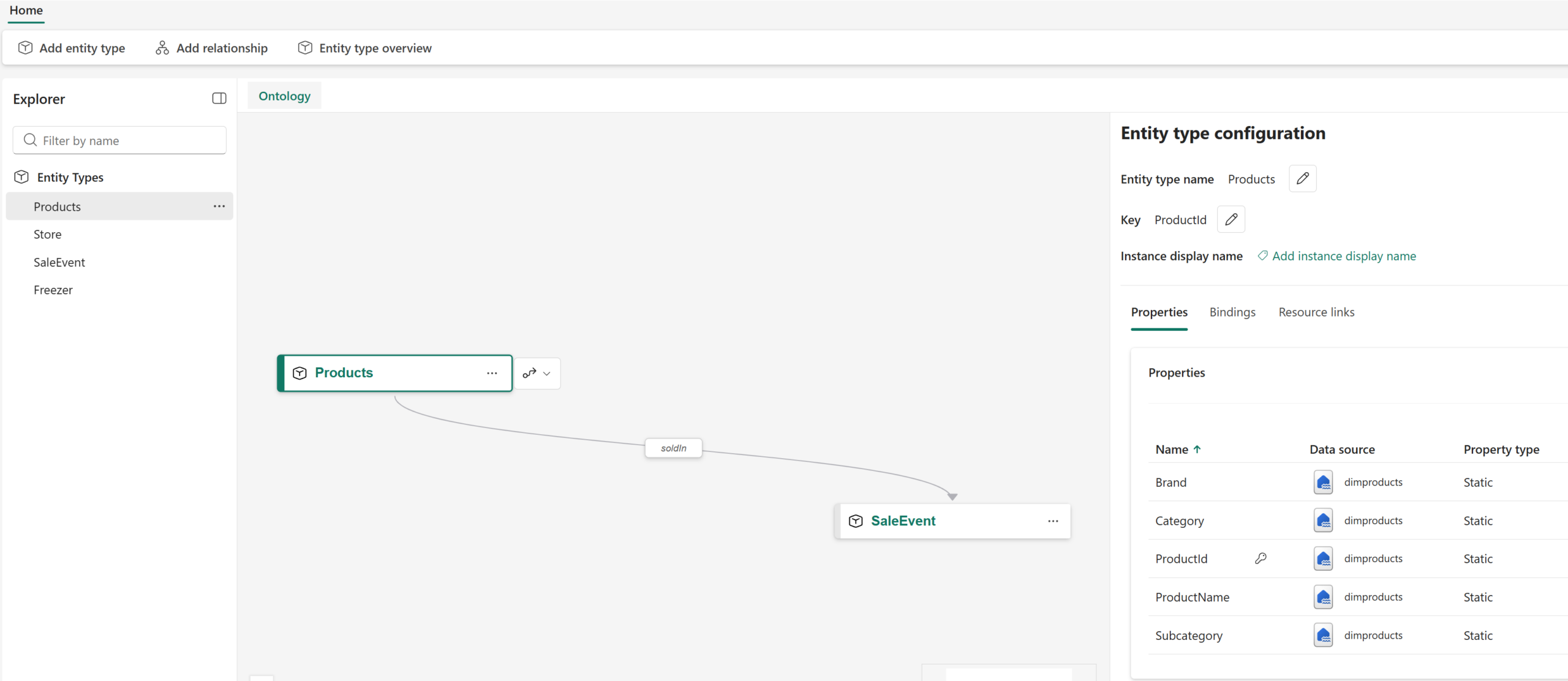
What an ontology is not
It is just as important to understand what an ontology is not. A Fabric ontology is not a Power BI semantic model. It is not a reporting layer where you create DAX measures and build visuals. It is not a data warehouse, a lakehouse, or a place where you copy and store another version of the data.
This is probably the most common misunderstanding. Because Fabric Ontology can be generated from a Power BI semantic model, it is easy to assume it becomes another kind of semantic model. It does not. A semantic model is designed for reporting and analytics. It contains measures, calculations, relationships, hierarchies, and business logic optimized for Power BI reports and dashboards. An ontology serves a different purpose.
An ontology is a business meaning layer. It defines entities, properties, relationships, rules, and constraints, and then binds those definitions to real data sources in Fabric. In other words, it maps meaning to data without turning the ontology into another storage layer or reporting model. That distinction matters, because if you expect Ontology to behave like a Power BI model, you will be disappointed. If you understand it as a shared business vocabulary for reasoning, AI, and relationship exploration, it starts to make a lot more sense. Ontology provides the shared context layer, while semantic models remain their own representation for analysis and reporting.
How Fabric Ontology binds meaning to data
The binding step is where an ontology becomes useful instead of just being a nice conceptual diagram. Once you define an entity such as Customer, Product, Order, Flight, or Runway, you bind it to actual data sources in Fabric. Those sources can include lakehouse tables, warehouse tables, eventhouse data, event streams, geospatial data, or existing Power BI semantic models.
The binding maps columns to properties, connects identifiers to relationships, and turns raw data into typed business entities. A row in a table is no longer just a row in a table. It becomes an instance of something the business understands.
This is a subtle but important shift. In a traditional table-centric world, users often need to know which table to query, which columns to select, which joins to write, and which filters to apply. That works for technical users, but it does not scale well to every business user, and it definitely does not scale well to AI agents that need to reason across systems.
It also creates architectural flexibility. When physical schemas change, you can often update the binding layer instead of forcing every downstream consumer to relearn the underlying structures. That does not eliminate change, but it creates a cleaner separation between business meaning and physical implementation.
Why business concepts matter more than table names
One of the biggest benefits of an ontology is that it allows users to ask questions in business terms. Instead of thinking through a maze of tables and joins, a user can ask about customers, orders, shipments, flights, routes, delays, assets, or risks. The ontology gives Fabric the business context needed to interpret the question.
For example, a user should not have to know every table involved in flight operations to ask a meaningful question. They should be able to ask about delayed flights affected by poor runway conditions at a specific airport. Behind the scenes, that may involve flight data, runway data, weather data, airport data, geospatial data, and real-time event data. But the user should not have to think that way.
That is the real promise of Ontology. It lets the business interact with data in the language of the business. Not table names. Not cryptic column names. Not schema diagrams that only three people in the company understand. Business concepts.
How Ontology works with Graph in Microsoft Fabric
One of the more powerful parts of this story is how Ontology works with Graph in Microsoft Fabric. When Graph is enabled, entity instances become nodes and relationships become edges. That means your business concepts can be explored as a connected graph, not just as separate tables that require joins. Microsoft specifically describes ontology graph as a queryable instance graph built from data bindings and relationship definitions, where nodes are entity instances and edges are links between them.
A simple way to visualize this is: a Flight is a node, a Runway is a node, and “uses runway” is an edge. A Customer is a node, an Order is a node, and “places order” is an edge. Once the data is represented this way, relationship traversal becomes much more natural. Instead of hand-coding every join, you can navigate the connected business context directly.
This opens the door to visual exploration, relationship browsing, impact analysis, dependency analysis, pathfinding, and other graph-style operations. If a runway has poor conditions, you can explore what flights, terminals, ground service tasks, maintenance activities, or customer impacts may be connected to that issue.
This is where Fabric Ontology starts to feel very different from traditional analytics modeling. You are not just asking, “What happened?” You can start asking, “What is connected to this?” “What is affected by this?” “What might happen next?” That is a much richer way to understand the business.
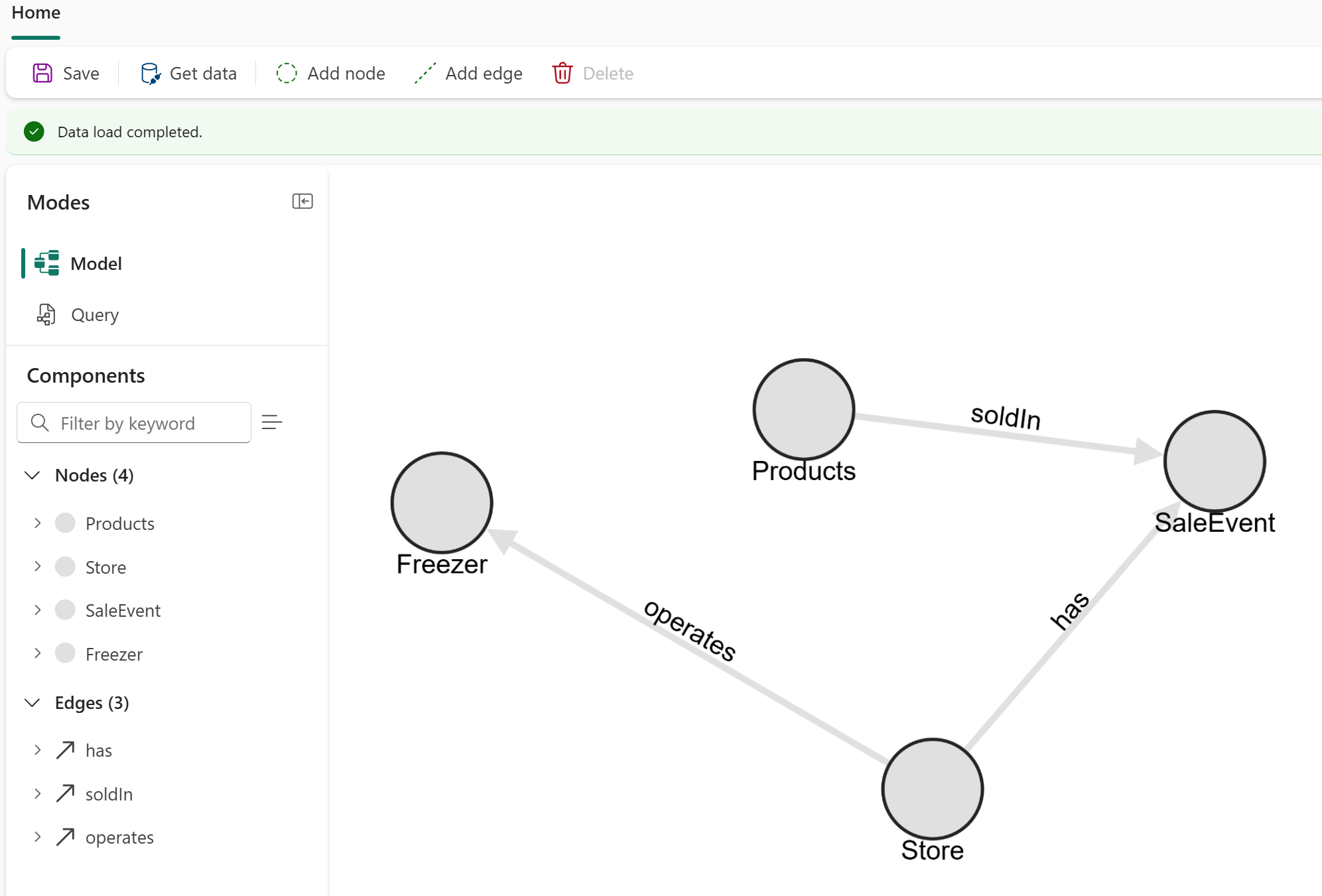
An airline example
The airline example is a good way to make this real. You might start with an existing Power BI semantic model that already contains flights, airlines, bookings, airports, and routes. From there, you can generate an ontology where those tables become business entities, columns become properties, and relationships are preserved. Microsoft’s ontology generation documentation says that generating from a semantic model creates entity types from tables, static properties from columns, and relationship types from model relationships.
Then you can enrich that ontology by binding it to additional data sources, such as real-time runway condition data, weather data, turnaround events, geospatial data, and maintenance data. Through data binding, those source tables and streams are mapped to the ontology’s entities, properties, and relationships, so runway friction, visibility, contamination, weather conditions, and maintenance events become part of the same connected business model. Suddenly, you are not just looking at a report. You are building a connected model of how airline operations actually work.
Now imagine a runway at JFK has poor friction and visibility due to weather. With a graph-enabled ontology, the operations team could explore which flights are affected, which terminals may experience delays, which ground service tasks are at risk, and which customer impacts may follow. That is a much more operational view of the business than simply looking at a dashboard that says delays are increasing.
Ontology vs. Power BI semantic models
This is where it is important to separate Ontology from Power BI semantic models. Power BI semantic models remain essential for reporting and analytics. They are optimized for measures, calculations, aggregations, visuals, and interactive analysis. If you want to know revenue, margin, sales trends, customer churn, or on-time performance, a semantic model is still the right tool.
Ontologies focus on shared meaning, relationships, reasoning, and AI understanding. Power BI is very good at answering questions like, “How much revenue did we generate?” or “What was our on-time performance last month?” An ontology helps answer questions like, “What business concepts are involved, how are they related, and what does this situation actually mean?”
So, Ontology is not a replacement for semantic models. In fact, they work better together. A semantic model can be used to jumpstart an ontology, because it already contains useful structure such as tables, columns, relationships, and business-friendly names if the model has been well designed. But once the ontology is created, its purpose is different. The semantic model supports reporting. The ontology supports shared understanding.
What you cannot do with an ontology
Because Ontology is new and powerful, it is easy to overstate what it does. So let’s be very clear. You cannot build Power BI reports directly from an ontology. You cannot use it as a Power BI dataset. You cannot create DAX measures or calculated columns in it. You cannot treat it as a replacement for the semantic model that powers your reports.
So Fabric Ontology can provide the business meaning layer used by a Fabric Data Agent to answer questions about your data, but it is not used to build reports and dashboards. The purpose of ontology is concept modeling, data binding, graph navigation, and business-level querying—not replacing the analytical model used for BI visuals.
That is not a weakness. It is a boundary. Good architecture depends on understanding what each layer is designed to do. Power BI semantic models are for reporting, metrics, measures, and interactive analysis. Fabric Ontology is for shared business meaning, consistent terminology, relationship modeling, reasoning, and grounding AI experiences.
This is one of those areas where the “what it is not” may be just as valuable as the “what it is.” If a team adopts Ontology expecting it to replace their reporting model, they are using the wrong mental model. If they adopt it to reduce semantic drift, align business concepts, support graph exploration, and give AI agents a better business vocabulary, they are much closer to the intended value.
How ontologies are created
The creation process happens directly in the Microsoft Fabric experience. There are two main paths Microsoft documents today: generate an ontology from an existing semantic model, or build one directly from OneLake data. When generated from a semantic model, tables become entity types, columns become properties, and relationships become ontology relationships. The generation process also creates data bindings for supported scenarios, but Microsoft notes that some work still needs to be completed manually, such as reviewing keys, binding relationship types, and adding time series data where needed.
From there, the important work is refinement. You rename technical objects into business-friendly terms, turning names like dimproduct into Product or factsales into SaleEvent. This is where business and technical teams should collaborate, because the goal is not just to reflect the database structure. The goal is to reflect how the business talks, thinks, and operates.
After the conceptual model is refined, you bind the ontology to real data. That includes mapping entity keys, attributes, relationships, and time-based data to the underlying sources. For example, CustomerID may become the key for Customer, customer name and status may become properties, and the relationship between Customer and Order can be defined explicitly.
Why Ontology matters for AI agents
This is where the AI angle becomes especially interesting. Agents and copilots need more than data access. They need business context. Without that context, they may retrieve information, but they may not understand the meaning behind it.
Ontology gives agents a common vocabulary and a consistent set of relationships to reason over. A Fabric Data Agent can answer questions using business concepts instead of forcing users to know the table structure. Microsoft’s documentation explicitly positions ontology as a shared context layer that can be consumed by humans and AI agents for cross-domain reasoning and decision-ready actions.
This is one of the strongest arguments for Fabric Ontology: without an explicit semantic layer, AI has to infer meaning from raw schemas, naming conventions, and prompts. With ontology, the business meaning is modeled directly. That makes AI answers easier to ground, easier to govern, and easier to align with how the business actually defines customers, products, orders, assets, and events.
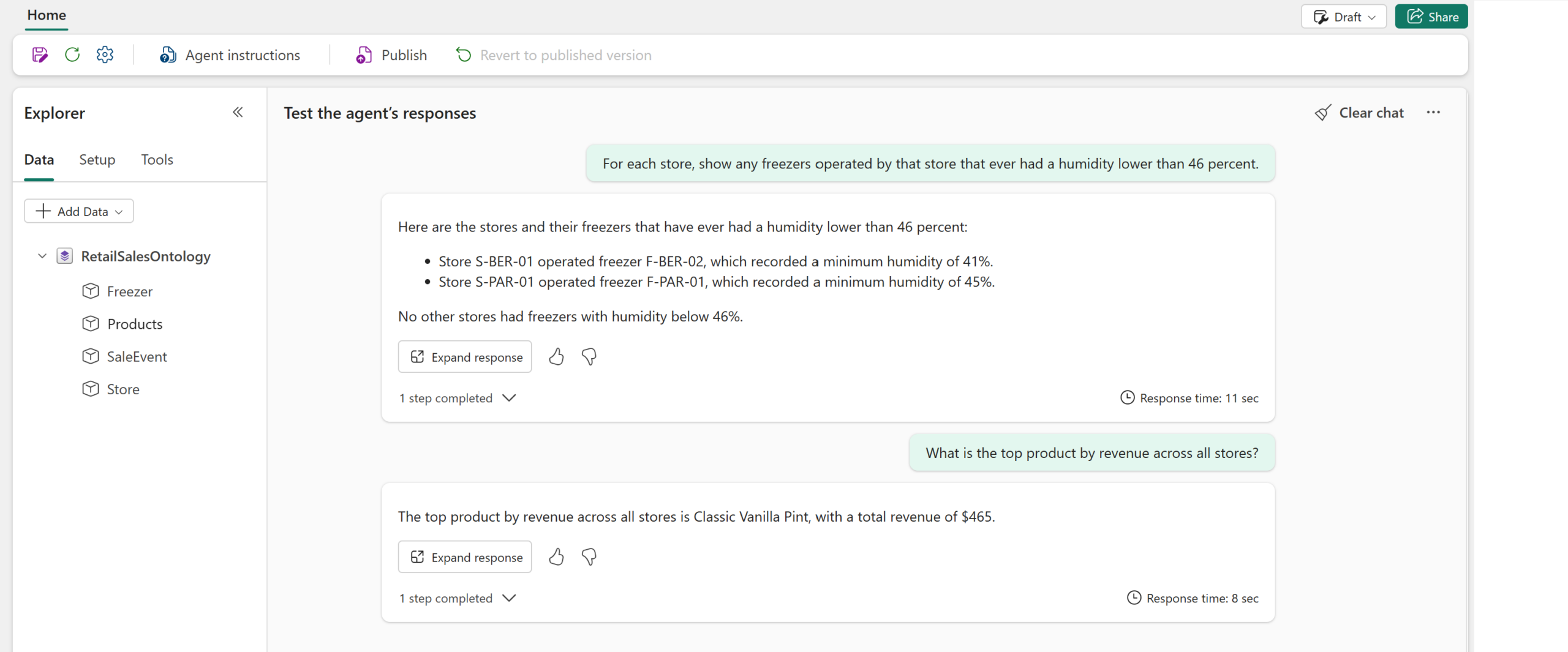
When Fabric Ontology is most valuable
Fabric Ontology is especially valuable when:
- the same business entity is defined differently across teams or systems
- you need cross-domain consistency and governance
- you want AI agents to reason over business concepts instead of raw tables
- you need graph-style exploration of connected business context
- you expect schemas and source systems to evolve over time but do not want every downstream consumer tightly coupled to those changes
In other words, ontology is most useful when reporting alone is not enough. If your main need is dashboards, a semantic model may be sufficient. If your need is shared business understanding across analytics, AI, and connected processes, ontology becomes far more compelling.
The agility benefit
The biggest benefit of Fabric Ontology may be agility. Physical schemas change. New data sources appear. Teams rename columns, move tables, adopt new systems, and create new models. If every report, query, application, and agent is tightly coupled to physical structures, those changes become painful.
Ontology creates an abstraction layer between business meaning and physical data. When a new source arrives or an existing schema changes, teams can often rebind the data to the ontology instead of rewriting every piece of downstream logic. That is not magic, but it is a much better operating model than scattering business meaning across hundreds of disconnected artifacts.
This is especially important in larger organizations where different domains may each have their own models, systems, and definitions. An ontology gives those domains a way to align around shared business concepts without forcing every system to look exactly the same underneath. That is a practical balance between standardization and flexibility.
The bottom line
Fabric Ontology helps move the conversation from “where is the data stored?” to “what does the business mean?” It defines the concepts, relationships, rules, and context that allow people and AI to work from the same shared understanding. That is a big deal, because most organizations do not suffer from a lack of data. They suffer from a lack of consistent meaning.
Semantic models remain the right tool for Power BI reporting and metrics. Ontologies provide the business meaning layer that helps unify data across systems, support graph exploration, and give agents a better foundation for reasoning. Together, they help organizations get closer to a world where users do not need to understand every table, join, and schema to ask good questions and get trusted answers.
In short, Fabric Ontology is about making data understandable in business terms. It does not replace your existing analytics investments. It gives them more context, more consistency, and more intelligence. And in a world where AI agents are going to become more involved in how organizations analyze, monitor, and act on data, that shared understanding may become one of the most important layers in the modern data architecture.
More info: